Busque den Google.

Los Resultado de Google!

Mostrando entradas con la etiqueta UNLOCK. Mostrar todas las entradas

Unlock Modem MW41TM de TMOBILE


Unlock Modem mw41tm de TMOBILE

para los que tienen la NCK 


Exe Version: NCKdongle v19.2

IMEI checksum seems ok

Brand: Alcatel Modem

Model: Y850D

IMEI: 01473400278XXXX

NCK    : 5224234012 utilizamos este codigo

NSCK  : 8300504211

SPCK  : 5124979596

SIM    : 6220947440

C        : 2140405013

Other :6223653013

-------------------------- 

1.- Conectamos el equipo encendido.
2.- Seleccionamos Transferencia de archivos y elegimos siempre.
3.- Tecleamos *#546368#*257#.
4.- Buscamos la opción svc Menu después port check test y debe quedar Enable.
5.- Elegimos el modelo en Octopus y damos en Unlock y solo esperar.
     (OJO Yo hago backup del QCN primero por si aca).

-------------------------------------------------------------------------------

Checking data...OK
Platform: LG Qualcomm
Selected port: COM38
Selected model: M257
Reading info...
Model ID: LG-M257
IMEI: 355575-08-279347-4
Android version: 7.0
Battery level: 54%
Mode: Normal
Firmware compiled date: Dec 21 2017
Firmware compiled time: 22:00:00
Firmware released date: Aug 20 2018
Firmware released time: 16:26:26
SW Version: MPSS.JO.2.0.c1.2-00017-8937_GENNS_PACK-1.106991.1.128672.1
IMEI: 355575-08-xxxx-4
Bluetooth address: B4:F7:A1:42:71:35
Wi-Fi MAC address: B4:F7:A1:F1:F2:60
SPC: 000000
Unlocking...
Reading QCN...
Send SPC...OK
Reading Mobile Property...OK
Reading Feature Mask...OK
Reading Roaming List 0...OK
Reading NV_Numbered Items...OK
Reading NV_Numbered SIM1 Items...OK
Reading NV_Numbered SIM2 Items...OK
Reading NV Items...OK
Reading EFS...OK
Reading Provisioning Items...OK
Reading QCN done!
Backup saved to "M257_35557508XXXX4_04-09-2019_15-59-38.qcn"
Switching to Download mode...OK
Initializing flash...OK
Reading partitions...OK
Detecting writing method...
LAF Error: 80000121.
Trying second method...
Trying third method...OK
Reading security area...OK
Backup saved to "M257_35557508XXXXX4_04-09-2019_16-05-53.SEC"
Writing security area...OK
Switching to Normal mode...
Found model LGM257AT* ÿh at port COM38
Send SPC...OK
Writing QCN...
Writing NV_Numbered Items...OK
Writing NV_Numbered SIM1 Items...OK
Writing NV_Numbered SIM2 Items...OK
Writing QCN done!
Phone successfully unlocked!
Rebooting phone...

Performed by 2.9.6 Software version.

Unlock JKM-LX3 DESBLOQUEO LIBERAR

Hasta la fecha solo por APK Server se puede, ninguna herramienta lo soporta hasta el momento.

G965U+ FRP SAMSUNG S9+


1- COMBINATION_FAC_FA80_G965USQU3ARG2

2- ACTIVE OEM UNLOCK OPTION IN DEVELOPER SETTINGS
3- HARD RESET FROM INTERNAL OPTION
4- FLASH 4 FILE STOCK FIRMWARE 

Unlock Luno Orange

Selected connection metod: META Mode
Exe version: NCKDongle AndroidMTK 2.5.9.3
Selected model: MT6572
Action: Unlock
Scanning for presents meta ports...
Phone must be off with battery inside. 
Please insert USB cable now...
In some phones need to keep VOL- button untill inserting USB cable.
[19]Detected: MediaTek PreLoader USB VCOM (Android) (COM19) 
\\?\usb#vid_0e8d&pid_2000#6&332e6dd3&0&3#{a5dcbf10-6530-11d2-901f-00c04fb951ed} 
Starting META mode, wait...
Restarting to meta,wait....
If drivers missing, please install CDC drivers.
This can take up to 5 min on slow phones.
If take too long, check device manager for drivers.
[10]META Port Detected: MediaTek USB VCOM (Android) (COM10) 
USB\VID_0E8D&PID_2007\6&332E6DD3&0&3 
Start sync target, waiting responce.....
[AP]BaseBand CPU : MT6572,S01
[AP]APP_VER: ALPS.JB3.MP.V1.37
[META]BaseBand CPU : MT6572, E01
[META]SW_VER : MOLY.WR8.W1315.MD.WG.MP.V15.P11
[META]HW_VER : HUAWEI72_WE_JB3_HSPA_HW
Phone imei[1] : 866508022639996
Phone imei[2] : 866508022639996
Start direct unlock[SIM1]
Direct unlock done
Start direct unlock[SIM2]
Direct unlock done
All done.

J727A FRP 7.0 ---Aporte.

Saludos este método fue el que me funciono reciclando varios que vi en Internet. Mas Explicito no puedo ser.

1 - Tener activado el TalkBack
2 - Conectar a internet el dispositivo
3 - Dibujar una "L" en la pantalla
4 - Ir a Configuracion de TalkBack
5 - Bajar por el menu hasta Ayuda y Comentarios
6 - Get started with Voice Accesss
7 - Suspender TalkBack (Vol+ y Vol-)
8 - Entrar a Youtube y presionar el reloj, se abrira el buscador de  google y buscar ¨unrom bypass¨
9-  Elegir la primera pagina y descargar FRP_Android_7.apk "
10- Entrar favoritos y presionar Historial - Historial de Descargas y buscar FRP_Android_7.apk - Configuracion y activar Origenes desconocidos.
11- Instalar y abrir.... en la pantalla verde Presionar ¨Launch Calculator¨ y escribir (+30012012732+ y saldrá DRParser Mode y escribe *#0808# y eliges DM+ACM+ADB y reiniciar el teléfono.
12- Con Z3x hacer el resto.

Operation: Reset FRP
Selected model: SM-J710FN
Software version: 34.0

You must activate ADB before reset FRP  Yes
Goto 'Terms and conditions' press 'NEXT' and 'AGREE' EULA  Yes
Waiting ADB device... OK
Reading phone info...
Model: SAMSUNG-SM-J727A
Android version: 7.0
PDA version: J727AUCU1AQE1
CSC version: J727AATT1AQE1
Phone version: J727AUCU1AQE1
Product code: SM2J727AZKAATT
CSC country code: USA
CSC sales code: ATT
Phone SN: R28J81VC92B
IMEI: 35561708123XXXX
HW version: REV0.7
RF cal date: 20170815
Chip name: EXYNOS7870
Modem board: SHANNON315
Security patch: 2017-05-01
Boot Warranty bit: 0
SIM State: ABSENT
Incorrect model selected. This may damage your phone. Continue?  Yes
Bypass FRP... OK
For complete reset FRP, goto 'Backup and reset' and make 'Factory data reset'
Done with Samsung Tool PRO v.34.0

UNLOCK HTC VIRGIN HTC OPM92

diag

*sprint unlock en htc gcpro.
*get msl number and ##3424#, DM select.
*unlock again Service ADB - Sprint unlock.

GEt MSL process

Using Version...1.0.0.0057
Selected Model GT-I5500
Selected Task HTC Sprint Unlock(ADB)

Searching ADB device Please wait..
Device Detected...
SELinux := Enforcing
model:= 0PM92
Androids Version:= 6.0.1
Description Version:= 2.27.651.6 CL741318 release-keys
Platform:= msm8909 [ htc_a32e ]  [  ]
Baseband:= 1.11.C51211@60303
Device := htc_a32ewhl
MODEID := 0PM920000
CID := SPCS_002
PROJECT := A32E_WHL_M60_DESIRE_SENSE70_SPCS_MR
Security Patch := 01-04-2016
Network Mode := CDMA
Simstatus:= ABSENT
ANDROID-ID = HT5CPSY01931_00006FFE96
Device is not rooted

HTC SPRINT UNLOCKING STARTED...
MSL/SPC IS := 374231
Please select port,If you want to unlock, dial ##3424# enable DM.....


!!! Fail !!!!

Restarted phone...
Total Time Take...00:00:49
Log Saved


UNLOCK PROCESS

Using Version...1.0.0.0057
Selected Model GT-I5500
Selected Port HTC Diagnostic Interface COM151
Selected Task HTC Sprint Unlock(ADB)

Searching ADB device Please wait..
Device Detected...
SELinux := Enforcing
model:= 0PM92
Androids Version:= 6.0.1
Description Version:= 2.27.651.6 CL741318 release-keys
Platform:= msm8909 [ htc_a32e ]  [  ]
Baseband:= 1.11.C51211@60303
Device := htc_a32ewhl
MODEID := 0PM920000
CID := SPCS_002
PROJECT := A32E_WHL_M60_DESIRE_SENSE70_SPCS_MR
Security Patch := 01-04-2016
Network Mode := CDMA
Simstatus:= ABSENT
ANDROID-ID = HT5CPSY01931_0000F78227
Device is not rooted

HTC SPRINT UNLOCKING STARTED...
Fail to read MSL/SPC..
MSL/SPC IS := 374231
Direct Unlock Success...

!!! Success !!!!

Restarted phone...
Total Time Take...00:00:49
Log Saved

Desbloqueo Coolpad 3320A / unlock Coolpad .

Furious

1- Root kingo apk

2 - Eneable diag por con NCK y main module- android utilities

3 - QCOM SMart Tool..........ABD unlock y esperar

Desbloqueo / Unlock MODEM ALCATEL MODELO:MW41NF con NCKDONGLE

Hola

aqui les traigo el desbloqueo del MODEM ALCATEL MODELO:MW41NF orange

ir al NCKMAIN 6.50

elegir alcatel modems

elegir modelo Y850D

calcular el codigo ...poner el codigo al modem y listo espero esto les sirva de ayuda ya que busque en toda la red y nada

Saludos y gracias

es de orange/altice
trabaja 4G en claro

#NCKDONGLE #ALCATELMODEM #UNLOCKMODEM #MW41NF

Desbloqueo/ unlock Altice Starnaute 4 con NCKDongle

Con NckDongle AndroidMTK

Elegir el modelo starnaute 4 en la pestaña Altice

#nckdongle #Altice #S20 #unlock

FRP ALCATEL 5044R CON NCK QUALCOMM.

Exe Version: NckDongle Qualcomm Module 0.12.4
Operation: Reset FRP
Searching for phone.....
Qualcomm HS-USB QDLoader 9008 (COM318) detected. ------Instalar este driver
Hello received.
HW ID: 32004200E1009600 MSM8909
PK HASH: DF561473BCA15451CC489052D4E5FB2FA8FA3B4BB3A9FD9E0E97140FF20DBC58
Checking database for suitable loader.....
Arhitecture:32 bits
[32]Sending loader, please wait..
Waiting for loader to start...
[1] Send NOP ok, loader start.
CPU: MSM8909
MaxPayloadSizeFromTargetInBytes: 4096
MaxPayloadSizeToTargetInBytes: 8192
Reading partition info, wait.
Volume[0] Size: 7,28 GB  Partitions count: 40
[007C5BDF]Userdata Size: 3,89 GB
Erasing Alcatel FRP, wait.....
Erasing FRP, finished
Restarting phone.....
*************************************
Log saved: C:\Users\braha\Documents\NckDongle\qualcomm_module\qc_module_Logs\reset_frp_MSM8909_32004200E1009600_DF561473BCA15451CC489052D4E5FB2FA8FA3B4BB3A9FD9E0E97140FF20DBC581.txt
Total Time: 00:00:01
Done.


#FRP #ALCATEL #UNLOCK # NCK

Unlock Motorola WX181 – Liberar Motorola WX181 – Infinity Box – UFC Cables

Unlock Motorola WX181

IMG_0002

wx-series-pinout UFC2 Cable Adapter

IMG_0052

IMG_0046

==== c:\InfinityBox\MModule\MModule.exe [19/04/2011 06:19:41 p.m.] ====
http://www.infinity-box.com
http://www.infinity-best.com
http://www.infinity-cdma.com
http://www.pinfinder-box.com
http://www.language-editor.com
http://www.content-extractor.com

sales department: sales@infinity-box.com

support forum: http://forum.gsmhosting.com/vbb/f296/

Loading data, wait...
[Infinity Box] MModule v3.82
smart-card: connected
S/N: XXXXXXXX

Wait...
Device: Motorola-WX181
Done

==== [19/04/2011 06:22:01 p.m.] ====
COM4 [VCP0] selected
module  v3.82
Device: Motorola-WX181
Checking data, wait...
advanced flash detection enabled
Action: read/check information
====>  Boot ...
Press and HOLD Power button now !
error: can't detect device
Release Power button now !
in case of initial connection problem: on/off "Boot baudrate autoselect"
Boot Fail
Finished, time used: 1 min 35 sec
Remove/Install battery now !

==== c:\InfinityBox\MModule\MModule.exe [19/04/2011 06:48:03 p.m.] ====
http://www.infinity-box.com
http://www.infinity-best.com
http://www.infinity-cdma.com
http://www.pinfinder-box.com
http://www.language-editor.com
http://www.content-extractor.com

sales department: sales@infinity-box.com

support forum: http://forum.gsmhosting.com/vbb/f296/

Loading data, wait...
[Infinity Box] MModule v3.82
smart-card: connected
S/N: XXXXXXXX

Wait...
Device: Motorola-WX181
Done

==== [19/04/2011 06:48:26 p.m.] ====
COM4 [VCP0] selected
module  v3.82
Device: Motorola-WX181
Checking data, wait...
advanced flash detection enabled
Action: read/check information
====>  Boot ...
Press and HOLD Power button now !
error: can't detect device
Release Power button now !
in case of initial connection problem: on/off "Boot baudrate autoselect"
Boot Fail
Finished, time used: 18 sec
Remove/Install battery now !

==== [19/04/2011 06:49:27 p.m.] ====
COM4 [VCP0] selected
module  v3.82
Device: Motorola-WX181
Checking data, wait...
advanced flash detection enabled
Action: read/check information
====>  Boot ...
Press and HOLD Power button now !
19200 fixed
Connecting, wait...
Initializing [6223:8A05:8A00]...
CPU: MT6223
chip: 0011:4E38:A00C
status: 01
boot packet size: 0400
Release Power button now !
Boot Done
====>  Initialize ...
detecting chip #00 in region #00...
flash: 2088BAFFFFFFFF:2088BA00000000
flash: ST Intel std [def 003Fx010000 0008x002000] 4Mb
otp offset: 003F0000
number of flash chip/regions detected: 01/01
Initialize Done
====>  Set baud ...
921600
Set baud Done
====>  Initialize bootcode ...
Initialize bootcode Done
====>  Check firmware integrity ...
usb bootloader detect...
..
usb bootloader detect (phase #2)...
..
usb bootloader (chip) is absent
searching rom info...
search rom info finished
rom info structure: [standard] type (05)
TCL-ID is present
rom info detection finished
TCL-ID detection...
TCL-ID detection done
rom info ver: 05
sw version: JRD23_NEP_08A_PCB01_GSM_MT6223_S00.MAUI_08A_W08_36_SP1_V28_F1.BIN
project-id: MAUI.08A.W08.36.SP1.V28.F1, 00000000
code offset: 00000000
ffs offset/size [01]: 003A0000/00058000
TCL-ID identification
version: 564
provider: M181AA-2AAVDO1
customization: CM56GR10
customization: XM56GR10
TCL-ID identification done
rom info structure: [standard] type (05)
TCL-ID is present
ffs/eeprom address assigned: 003A0000
sec info (detailed) detection...
searching sec info#1...
search sec info#1 finished
sim-lock status: enabled
product id: JRD_COMMUNICATION_U91X_PRODUCTS
area1 is valid
area2 is valid
area3 is valid
area4 is valid
searching sec info#2...
.
search sec info#2 finished
detecting firmware version...
firmware version: JRD23_NEP_08A_PCB01_GSM_MT6223_S00.MAUI_08A_W08_36_SP1_V28_F1.BIN
detecting firmware build...
.........
firmware date/time: 2010-04-21 18-51
hw1: JRD23_NEP_08A_HW
hw2: 08A_JRD23_NEP_08A
done
detecting product-id...
product-id: U91X
detecting languages...
...........
language parameters detected
detected languages: En Nl Fr Es Pt
original imei: 0000F581454353
file saved: c:\InfinityBox\MModule\backup_security\Motorola-WX181_JRD23_NEP_08A_PCB01_GSM_MT6223_S00.MAUI_08A_W08_36_SP1_V28_F1__system_log__00000000_20110419-185035.B0X.bin
Finished, time used: 1 min 4 sec
Remove/Install battery now !

==== [19/04/2011 06:58:26 p.m.] ====
COM4 [VCP0] selected
module  v3.82
Device: Motorola-WX181
Checking data, wait...
advanced flash detection enabled
Action: rebuild security area
====>  Boot ...
Press and HOLD Power button now !
19200 fixed
Connecting, wait...
Initializing [6223:8A05:8A00]...
CPU: MT6223
chip: 0011:4E38:A00C
status: 01
error: initialize step #1 failed
Release Power button now !
in case of initial connection problem: on/off "Boot baudrate autoselect"
Boot Fail
Finished, time used: 13 sec
Remove/Install battery now !

==== [19/04/2011 06:59:05 p.m.] ====
COM4 [VCP0] selected
module  v3.82
Device: Motorola-WX181
Checking data, wait...
advanced flash detection enabled
Action: rebuild security area
====>  Boot ...
Press and HOLD Power button now !
19200 fixed
Connecting, wait...
Initializing [6223:8A05:8A00]...
CPU: MT6223
chip: 0011:4E38:A00C
status: 01
boot packet size: 0400
Release Power button now !
Boot Done
====>  Initialize ...
detecting chip #00 in region #00...
flash: 2088BAFFFFFFFF:2088BA00000000
flash: ST Intel std [def 003Fx010000 0008x002000] 4Mb
otp offset: 003F0000
number of flash chip/regions detected: 01/01
Initialize Done
====>  Set baud ...
921600
Set baud Done
====>  Initialize bootcode ...
Initialize bootcode Done
====>  Check firmware integrity ...
usb bootloader detect...
..
usb bootloader detect (phase #2)...
..
usb bootloader (chip) is absent
searching rom info...
search rom info finished
rom info structure: [standard] type (05)
TCL-ID is present
rom info detection finished
TCL-ID detection...
TCL-ID detection done
rom info ver: 05
sw version: JRD23_NEP_08A_PCB01_GSM_MT6223_S00.MAUI_08A_W08_36_SP1_V28_F1.BIN
project-id: MAUI.08A.W08.36.SP1.V28.F1, 00000000
code offset: 00000000
ffs offset/size [01]: 003A0000/00058000
TCL-ID identification
version: 564
provider: M181AA-2AAVDO1
customization: CM56GR10
customization: XM56GR10
TCL-ID identification done
rom info structure: [standard] type (05)
TCL-ID is present
ffs/eeprom address assigned: 003A0000
sec info (detailed) detection...
searching sec info#1...
search sec info#1 finished
sim-lock status: enabled
product id: JRD_COMMUNICATION_U91X_PRODUCTS
area1 is valid
area2 is valid
area3 is valid
area4 is valid
searching sec info#2...
.
search sec info#2 finished
security area (sec info, cust) calculation...
identification header detected
customization: XM56GR10
customization name adjusted
flash: 2088BAFFFFFFFF:2088BA00000000
Write: security area (sec info, cust)
security area (sec info, cust) calculation done
security area (sec info, hash) calculation...
max address is too big, should be recalculated: 0827D124->0826B790
..................security area (sec info, hash) detecting size...
security area (sec info, hash) detecting parameters...
security area (sec info, hash) encoding...
done
flash: 2088BAFFFFFFFF:2088BA00000000
Write: security area (sec info, hash)
security area (sec info, hash) calculation done
Check firmware integrity Done
====>  Check firmware content ...
Check firmware content Done
====>  Backup required data ...
original imei: 0000F581454353
flash: 2088BAFFFFFFFF:2088BA00000000
Backup required data Done
====>  Patch required data ...
Patch required data Done
====>  Special operation ...
Special operation Done
====>  Write ...
Write Done
====>  Finalization ...
ffs formatting...
flash: 2088BAFFFFFFFF:2088BA00000000
Finalization Done
file saved: c:\InfinityBox\MModule\backup_security\Motorola-WX181_JRD23_NEP_08A_PCB01_GSM_MT6223_S00.MAUI_08A_W08_36_SP1_V28_F1__system_log__00000000_20110419-190035.B0X.bin
Finished, time used: 1 min 27 sec
Remove/Install battery now !

File system has been modified !
It is need to press and HOLD phone "Power" button
during long time (up to 1 min) to make phone Powered-On !

MEP LIST - LISTADO MEP

MEP-16472-001 =PAKISTAN MOBILINK
MEP-04103-001 = OPERADOR T-MOBILE ALE
MEP-04103-001 =VODAFONE UK
MEP-04103-002 =OPERADOR SPRINT USA
MEP-04104-007 =T-MOBILE – USA
MEP-04598-004 = OPERADOR CINGULAR ..8700-
MEP-04598-005 =AT&T
MEP-04598-005 =AT&T
MEP-04626-002 = OPERADOR ROGERS CANADA
MEP-04626-002 =ROGERS – CANADA
MEP-04626-002 =ROGERS CANADÀ
MEP-05277-004 =SFR VODAFONE
MEP-05277-005 =8520 SFR FRANCE
MEP-05277-005 =SFR FRANCE
MEP-06041-005 =MOVISTAR (CHILE Y ESPAÑA)
MEP-06041-005 =MOVISTAR ESPAÑA
MEP-06041-006 =OPERADOR MOVISTAR VENEZUELA
MEP-06041-007 =MOVISTAR CHILE 8120
MEP-06041-007 =OPERADOR MOVISTAR ESPAÑA
MEP-06041-008 =MOVISTAR
MEP-06041-008 =MOVISTAR 8520 -8300- 8900-9500-0220 (CHILE Y ESPAÑA)
MEP-06041-008 =MOVISTAR VENEZUELA
MEP-06041-008 =OPERADOR MOVISTAR MEXICO…8520
MEP-06041-009 =MOVISTAR 9700
MEP-06041-009 =OPERADOR MOVISTAR COLOMBIA… 9700 BOL 2
MEP-06424-002 =OPERADOR UNITED KINGDOM
MEP-06813-002 =OPERADOR VODAFONE ESPAÑA STRON.. 9520
MEP-06813-002 =VODAFONE SPAIN
MEP-06813-002 =VODAFONE UK BLACKBERRY 9500
MEP-06813-002 =VODAFONE, SPAIN
MEP-06814-001 =8700V LOCKED TO VODAFONE
MEP-06814-001 =OPERADOR VODAFONE BB ….7290
MEP-06814-001 =VODAFONE BB 8700
MEP-06814-004 =VODAFONE UK
MEP-07321-002 =ORANGE
MEP-07321-002 =ORANGE UK
MEP-07723-004 =OPERADOR ORANGE UK
MEP-07723-005 =CLARO – DOMINICAN REPUBLIC
MEP-07723-005 =CLARO –REPUBLICA DOMINICANA
MEP-07723-005 =ORANGE FRANCIA
MEP-07723-005 =ORANGE REPUBLICA DOMINICANA
MEP-07723-005 =ORANGE REPUBLICA DOMINICANA,
MEP-08589-001 =VODAFONE PORTUGAL
MEP-08918-001 =BOUYGUES
MEP-08918-001 =BOUYGUES TELECOM
MEP-09292-004 =BB 8520 TMOBILE UK
MEP-09292-004 =T MOBILE UK
MEP-09917-001 =ENTEL
MEP-10129-004 =CABLE AND WIRELESS
MEP-10129-004 =PANAMA – CABLE AND WIRELESS
MEP-11016-001 =OPERADOR PERSONAL …8100-
MEP-11534-007 =CLARO REPUBLICA DOMINICANA
MEP-11534-008 = BLACKBERRY 8520 CLARO DOMINICAN REPUBLIC
MEP-11534-008 =8520 DE CLARO
MEP-11534-008 =BLACKBERRY 8220 TELCEL
MEP-11534-008 =BLACKBERRY 8520 CLARO DOMINICAN REPUBLIC
MEP-11534-008 =CLARO EL SALVADOR – CHILE – RE. DOMINICANA MEXICO (TELCEL)
MEP-11534-008 =CLARO REPUBLICA DOMINICANA
MEP-11534-008 =OPERADOR HONDURAS CLARO …8520-8220
MEP-11534-008 =TELCEL MÉXICO
MEP-12209-004 =CLARO
MEP-12209-004 =CLARO EN ALGUNOS PAISES
MEP-12209-008 =OPERADOR COMCEL 8520-8900-9700-8320
MEP-14052-001 =NEXTEL USA BLACKBERRY 8350I
MEP-14052-002 =SPRINT USA
MEP-14074-002 =TELUS BLACKBERRY 9530
MEP-14074-002 =TELUS, TORONTO, CANADA
MEP-15326-001 = OPERADOR VERIZON BB 9530
MEP-15326-001 =BLACKBERRY 9530 VERIZON USA
MEP-15326-002 = OPERADOR VERIZON USA …8100
MEP-15326-002 =I.T.E US LISTED 89NN CANADA
MEP-15326-002 =VERIZON WIRELESS – USA
MEP-16472-001 =PAKISTAN MOBILINK
MEP-20669-001 =BLACKBERRY 8100 DIGITEL
MEP-20669-001 =DIGITEL
MEP-20669-001 =OPERADOR DIGITEL VENEZUELA.. FLY 8220-8520
MEP-21545-001 =IRELAND VODAFONE
MEP-21545-001 =VODAFONE IRLANDA
MEP-22793-001 =OPERADOR BELL USA
MEP-23361-001 =FIDO CANADA
MEP-24409-002 =OPERADOR MOVILNET VENEZUELA…9000-8900-8900
MEP-27488-001 =OPERADOR TIGO….. 8520
MOVITAR CHILE =MEP-06041-008 8900

Debloquear / Unlock / Liberar ZTE G-R221

Hola, yo probe con esta configuracion por que tenia
un cable Mini Usb A, de un Sanyo S1, el cual utilizaba para conectar
todos los celulares que tienen este pin entre ellos Blackberrys, Mot V8, Nokia y Samsung.
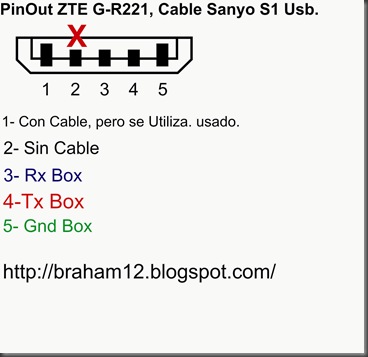
PinOut ZTE G-R221


1- Mire que funcionara para leer el celular.


==== D:\Archivos de programa\InfinityBox\MModule\MModule.exe [18/01/2011 07:41:47 p.m.] ====
web site: http://www.infinity-box.com
support forum in English: http://forum.gsmhosting.com/vbb/f296/
http://www.infinity-cdma.com
http://www.infinity-best.com
http://www.pinfinder-box.com
Loading data, wait...
[Infinity Box] MModule v3.72
smart-card: connected
S/N: 516F:0116
Wait...
Device: Aiko-17G
Done
Device: ZTE-R221
Action: read/check information
Model: ZTE-R221
Checking data, wait...
Phone should be Switched ON !
Connecting, wait...
error: connection failed !
If you are sure that cable is good - select another baudrate (f.e. set baudrate to "autodetect")
operation failed !
Finished, time used: 13 sec
Remove/Install battery now !

Action: read/check information
Model: ZTE-R221
Checking data, wait...
Phone should be Switched ON !
Connecting, wait...
Phone detected, wait...
Hardware version: MT6223, E05
Hardware version: ZTENJ23D_09A_HW
Software version: DOMI-CLA-T8SM-P109A1
Software date: 2000.00.00
Barcode: 252778623258                                                10P
imei-1: 359264032320557
Finished, time used: 7 sec
Remove/Install battery now !


Con esto dije que funciona el cable, vamos a seguir leyendo el cell a ver que pasa!!!


2- Procedi a Desbloquear el celular.


==== D:\Archivos de programa\InfinityBox\MModule\MModule.exe [18/01/2011 07:48:55 p.m.] ====
web site: http://www.infinity-box.com
support forum in English: http://forum.gsmhosting.com/vbb/f296/
http://www.infinity-cdma.com
http://www.infinity-best.com
http://www.pinfinder-box.com
Loading data, wait...
[Infinity Box] MModule v3.72
smart-card: connected
S/N: 516F:0116
Wait...
Device: ZTE-R221
Done
==== [18/01/2011 07:49:10 p.m.] ====
COM6 [VCP0] selected
module  v3.72
Action: "user code"
unlock method: smart fast
Model: ZTE-R221
Checking data, wait...
Phone should be Switched OFF !
Press and HOLD Power button now !
error: can't activate test mode
error: operation failed !
Finished, time used: 1 sec
Remove/Install battery now !
Action: read/check information
Model: ZTE-R221
Checking data, wait...
Phone should be Switched ON !
Connecting, wait...
Phone detected, wait...
Hardware version: MT6223, E05
Hardware version: ZTENJ23D_09A_HW
Software version: DOMI-CLA-T8SM-P109A1
Software date: 2000.00.00
Barcode: 252778623258                                                10P
imei-1: 359264032320557
Finished, time used: 2 sec
Remove/Install battery now !
==== [18/01/2011 07:49:34 p.m.] ====
COM6 [VCP0] selected
module  v3.72
Action: "user code"
unlock method: smart fast
Model: ZTE-R221
Checking data, wait...
Phone should be Switched OFF !
Press and HOLD Power button now !
19200 autodetect
Initializing [6223:8A05:8A00]...
CPU: MT6223
chip: 0011:4662:000C
status: FF
Connecting at 19200, wait...
Release Power button now !
Phone detected, wait...
Hardware: MT6223,E05
Date: 2000.00.00
Version: 1.0
Version: DOMI-CLA-T8SM-P109A17V1.0.1B01
Version: ZTENJ23D_09A_HW
86 byte(s) read
imei: 35926403232055
connection Ok
192 byte(s) read
reading data...
reading data #2...
building new data...
writing data...
user code set to: 0000
Finished, time used: 14 sec
Remove/Install battery now !
==== [18/01/2011 07:50:46 p.m.] ====
COM6 [VCP0] selected
module  v3.72
Action: "sp-unlock"
unlock method: smart fast
Model: ZTE-R221
Checking data, wait...
Phone should be Switched OFF !
Press and HOLD Power button now !
error: can't activate test mode
error: operation failed !
Finished, time used: 6 sec
Remove/Install battery now !
==== [18/01/2011 07:51:09 p.m.] ====
COM6 [VCP0] selected
module  v3.72
Action: "sp-unlock"
unlock method: smart fast
Model: ZTE-R221
Checking data, wait...
Phone should be Switched OFF !
Press and HOLD Power button now !
19200 autodetect
Initializing [6223:8A05:8A00]...
CPU: MT6223
chip: 0011:4662:000C
status: FF
Connecting at 19200, wait...
Release Power button now !
Phone detected, wait...
Hardware: MT6223,E05
Date: 2000.00.00
Version: 1.0
Version: DOMI-CLA-T8SM-P109A17V1.0.1B01
Version: ZTENJ23D_09A_HW
86 byte(s) read
imei: 35926403232055
connection Ok
192 byte(s) read
reading data...
reading data #2...
building new data...
writing data...
180 byte(s) read
reading data...
972 byte(s) read
building new data...
writing data...
verifying...
verification Ok      
done  ----------------------------------------Eureca!!!!! Se Hizo!!!
Finished, time used: 15 sec
Remove/Install battery now !


UNLOCK / DESBLOQUEAR LG GR500 CON SETOOLBOX3


1)- Hacer este Jumper.
image
2)-
PRECIONAR UNLOCK/REPAIR
CLARO ESTA CON LA PILA PUESTA.
SIGNED MODE (USING SERVER)
CFG:100000000000
ChipID:D900,EMP protocol:0401
BOOTROM MODE DETECTED
OTP DBG: [1,54,0,01201100XXXXXX]
OTP LOCKED:1 CID:54 PAF:0 IMEI:01201100XXXXXX CERT:RED
LDR:080805 1255 YTRCXC1723918_A2_DB3200_PRODUCTION_LOADER_ACC_SDRAM_P2B
LDR CAPS:SYSTEM SIGNATURE
LDR:080905 0936 YTRCXC1723919_1A2_DB3200_PRODUCTION_LOADER_APP_SDRAM_JEFF_CABS_P2D
LDR CAPS:SYSTEM FLASH GDFS FILESYSTEM
WRITING CLEAR SIMLOCK UNITS...
ALL UNLOCK/LOCK CODES SET TO "33161781"
phone detached
Elapsed: 29 secs.

Sony Ericsson C901


Este es un SEMC A2 CHIPSET:DB3210.
Desbloqueo/ Reparar - Unlock / Repair.
-Elegir el modelo

-Marcar en settings
*Signed Mode
*Enable alternative security bypass
-En set domain to dejar en current
-Presionar Unlock/Repair
Flasheo
-Ir a pestaña SEMC A2

-Se debe marcar Signed Mode en Settings
-Cargar Main y FS en Files y CDA en misc files (sino marcar complete phone after flash)
-Presionar Flash
-Usar ECC mode none (0) para flasheo en modo de deteccion de errores (Solo para reparaciones)

Sony Ericsson C702


Este es un CHIPSET:DB2020.


Desbloqueo/ Reparar
Unlock/Repair

CID 36

-Para telefonos con CID 36 se debe presionar Recovery y cargar EROM de CID 49.

CID 49/51/52/53

-Usar interfaz USB
-Seleccionar modelo
-Marcar en settings: 
*Signed Mode
*Enable alternative security bypass
*Enable preloader bypass (SOLO PARA CID 50/51)
-Verificar presencia de archivo rest y bypass package
-Presionar Unlock/Repair

-Se debe utilizar reset mode para reparar EROM, GDFS dañada, SCRC units.

CID 49/51/52/53

Flasheo

-Se debe marcar Signed Mode
-Se debe flashear firmware del mismo CID que el Flash CID del telefono
-Cargar Main y FS en Files y CDA en misc files (sino marcar complete phone after flash)

Sony Ericsson C510


Este es un SEMC A2 CHIPSET:DB3210.
Desbloqueo/ Reparar - Unlock / Repair.
-Elegir el modelo
-Marcar en settings
*Signed Mode
*Enable alternative security bypass
-En set domain to dejar en current
-Presionar Unlock/Repair
Flasheo
-Ir a pestaña SEMC A2
-Se debe marcar Signed Mode en Settings
-Cargar Main y FS en Files y CDA en misc files (sino marcar complete phone after flash)
-Presionar Flash
-Usar ECC mode none (0) para flasheo en modo de deteccion de errores (Solo para reparaciones)

DESBLOQUEAR LIBERAR SEMC ODM W395

Este lo hice con cable RJ-45. SIGNED MODE Solamente.


SIGNED MODE (USING SERVER)
CFG:100000000000
PLEASE ATTACH TURNED OFF PHONE NOW

EROM "R7A024" AID: 0001
SOFTWARE AID: 0001
SIMLOCK STATE: "NOT_TAMPERED"
LOADER AID: 0002
FLASH ID: "00EC/220C"
LOADER VERSION: "R3A011"

PHONE IMEI:3579060xxxxxxxx
MODEL (from GDFS): W395
FACTORY CXC: 1207-7713 R7A024
CURRENT CXC: 12175563_R1CB011
CURRENT CDA: 1224-9550_R1A
CURRENT FS: 12175582_FS_APAC-ANZ_HS_YO_R1CB011
LANGUAGE: AL
Elapsed: 11 secs.
SIGNED MODE (USING SERVER)
CFG:100000000000
PLEASE ATTACH TURNED OFF PHONE NOW
PRESS "POWER ON" BUTTON SHORTLY...

EROM "R7A024" AID: 0001
SOFTWARE AID: 0001
SIMLOCK STATE: "NOT_TAMPERED"
LOADER AID: 0002
FLASH ID: "00EC/220C"
LOADER VERSION: "R3A011"

PHONE IMEI:357906xxxxxxxx
MODEL (from GDFS): W395
FACTORY CXC: 1207-7713 R7A024
CURRENT CXC: 12175563_R1CB011
CURRENT CDA: 1224-9550_R1A
CURRENT FS: 12175582_FS_APAC-ANZ_HS_YO_R1CB011
LANGUAGE: AL
Elapsed: 11 secs.
SIGNED MODE (USING SERVER)
CFG:100000000000
PLEASE ATTACH TURNED OFF PHONE NOW
PRESS "POWER ON" BUTTON SHORTLY...

EROM "R7A024" AID: 0001
SOFTWARE AID: 0001
SIMLOCK STATE: "NOT_TAMPERED"
LOADER AID: 0002
FLASH ID: "00EC/220C"
LOADER VERSION: "R3A011"

PHONE IMEI:357906xxxxxxxx
USERLOCK RESET TO "0000"
TOTAL CALL TIME RESET
Elapsed: 15 secs.