Busque den Google.

Los Resultado de Google!

error en taringa!


Programar Blackberry 8330Sprint

Hola, acabo de terminar este telefono el BB8330 Sprint.

Facil, antes no me salia, pero ya coregi el error.

Leer codigo con UNICDMA

Blackberry 8330 Curve
Address: 0x10700000 Length: 1703936

sacar el codigo con WinHex.

Programar el PRL con el QPST 2.7 Build 231.

Nos saldra Unknow(83).

Abrimos Service Programming.

Elegimos el SURF-6300BB.

y por ahi trabajamos y le ponemos el PRL.

SmartClip Errores C4 y C8

Buscando el teléfono... Encontrado Motorola Phone (V1075), Entrando en interfaz de test... OK
Modelo V1075
Firmware R252211LD_U_85.97.CDP
Entrando en modo flash... OK [S Flash Rainbow POG]
Leyendo versión del boot del teléfono... 6.81
Preparando...
Error C8

Fallido
Error C4


Esto se soluciona actualizando la Smart Clip y la S-Card, luego reiniciando la Pc.
Así lo resolví después de varios días tras ocurrirme este error constantemente.


MEP LIST - LISTADO MEP

MEP-16472-001 =PAKISTAN MOBILINK
MEP-04103-001 = OPERADOR T-MOBILE ALE
MEP-04103-001 =VODAFONE UK
MEP-04103-002 =OPERADOR SPRINT USA
MEP-04104-007 =T-MOBILE – USA
MEP-04598-004 = OPERADOR CINGULAR ..8700-
MEP-04598-005 =AT&T
MEP-04598-005 =AT&T
MEP-04626-002 = OPERADOR ROGERS CANADA
MEP-04626-002 =ROGERS – CANADA
MEP-04626-002 =ROGERS CANADÀ
MEP-05277-004 =SFR VODAFONE
MEP-05277-005 =8520 SFR FRANCE
MEP-05277-005 =SFR FRANCE
MEP-06041-005 =MOVISTAR (CHILE Y ESPAÑA)
MEP-06041-005 =MOVISTAR ESPAÑA
MEP-06041-006 =OPERADOR MOVISTAR VENEZUELA
MEP-06041-007 =MOVISTAR CHILE 8120
MEP-06041-007 =OPERADOR MOVISTAR ESPAÑA
MEP-06041-008 =MOVISTAR
MEP-06041-008 =MOVISTAR 8520 -8300- 8900-9500-0220 (CHILE Y ESPAÑA)
MEP-06041-008 =MOVISTAR VENEZUELA
MEP-06041-008 =OPERADOR MOVISTAR MEXICO…8520
MEP-06041-009 =MOVISTAR 9700
MEP-06041-009 =OPERADOR MOVISTAR COLOMBIA… 9700 BOL 2
MEP-06424-002 =OPERADOR UNITED KINGDOM
MEP-06813-002 =OPERADOR VODAFONE ESPAÑA STRON.. 9520
MEP-06813-002 =VODAFONE SPAIN
MEP-06813-002 =VODAFONE UK BLACKBERRY 9500
MEP-06813-002 =VODAFONE, SPAIN
MEP-06814-001 =8700V LOCKED TO VODAFONE
MEP-06814-001 =OPERADOR VODAFONE BB ….7290
MEP-06814-001 =VODAFONE BB 8700
MEP-06814-004 =VODAFONE UK
MEP-07321-002 =ORANGE
MEP-07321-002 =ORANGE UK
MEP-07723-004 =OPERADOR ORANGE UK
MEP-07723-005 =CLARO – DOMINICAN REPUBLIC
MEP-07723-005 =CLARO –REPUBLICA DOMINICANA
MEP-07723-005 =ORANGE FRANCIA
MEP-07723-005 =ORANGE REPUBLICA DOMINICANA
MEP-07723-005 =ORANGE REPUBLICA DOMINICANA,
MEP-08589-001 =VODAFONE PORTUGAL
MEP-08918-001 =BOUYGUES
MEP-08918-001 =BOUYGUES TELECOM
MEP-09292-004 =BB 8520 TMOBILE UK
MEP-09292-004 =T MOBILE UK
MEP-09917-001 =ENTEL
MEP-10129-004 =CABLE AND WIRELESS
MEP-10129-004 =PANAMA – CABLE AND WIRELESS
MEP-11016-001 =OPERADOR PERSONAL …8100-
MEP-11534-007 =CLARO REPUBLICA DOMINICANA
MEP-11534-008 = BLACKBERRY 8520 CLARO DOMINICAN REPUBLIC
MEP-11534-008 =8520 DE CLARO
MEP-11534-008 =BLACKBERRY 8220 TELCEL
MEP-11534-008 =BLACKBERRY 8520 CLARO DOMINICAN REPUBLIC
MEP-11534-008 =CLARO EL SALVADOR – CHILE – RE. DOMINICANA MEXICO (TELCEL)
MEP-11534-008 =CLARO REPUBLICA DOMINICANA
MEP-11534-008 =OPERADOR HONDURAS CLARO …8520-8220
MEP-11534-008 =TELCEL MÉXICO
MEP-12209-004 =CLARO
MEP-12209-004 =CLARO EN ALGUNOS PAISES
MEP-12209-008 =OPERADOR COMCEL 8520-8900-9700-8320
MEP-14052-001 =NEXTEL USA BLACKBERRY 8350I
MEP-14052-002 =SPRINT USA
MEP-14074-002 =TELUS BLACKBERRY 9530
MEP-14074-002 =TELUS, TORONTO, CANADA
MEP-15326-001 = OPERADOR VERIZON BB 9530
MEP-15326-001 =BLACKBERRY 9530 VERIZON USA
MEP-15326-002 = OPERADOR VERIZON USA …8100
MEP-15326-002 =I.T.E US LISTED 89NN CANADA
MEP-15326-002 =VERIZON WIRELESS – USA
MEP-16472-001 =PAKISTAN MOBILINK
MEP-20669-001 =BLACKBERRY 8100 DIGITEL
MEP-20669-001 =DIGITEL
MEP-20669-001 =OPERADOR DIGITEL VENEZUELA.. FLY 8220-8520
MEP-21545-001 =IRELAND VODAFONE
MEP-21545-001 =VODAFONE IRLANDA
MEP-22793-001 =OPERADOR BELL USA
MEP-23361-001 =FIDO CANADA
MEP-24409-002 =OPERADOR MOVILNET VENEZUELA…9000-8900-8900
MEP-27488-001 =OPERADOR TIGO….. 8520
MOVITAR CHILE =MEP-06041-008 8900

Debloquear / Unlock / Liberar ZTE G-R221

Hola, yo probe con esta configuracion por que tenia
un cable Mini Usb A, de un Sanyo S1, el cual utilizaba para conectar
todos los celulares que tienen este pin entre ellos Blackberrys, Mot V8, Nokia y Samsung.
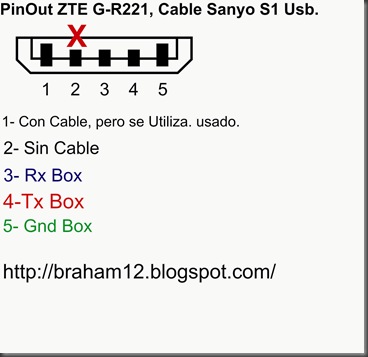
PinOut ZTE G-R221


1- Mire que funcionara para leer el celular.


==== D:\Archivos de programa\InfinityBox\MModule\MModule.exe [18/01/2011 07:41:47 p.m.] ====
web site: http://www.infinity-box.com
support forum in English: http://forum.gsmhosting.com/vbb/f296/
http://www.infinity-cdma.com
http://www.infinity-best.com
http://www.pinfinder-box.com
Loading data, wait...
[Infinity Box] MModule v3.72
smart-card: connected
S/N: 516F:0116
Wait...
Device: Aiko-17G
Done
Device: ZTE-R221
Action: read/check information
Model: ZTE-R221
Checking data, wait...
Phone should be Switched ON !
Connecting, wait...
error: connection failed !
If you are sure that cable is good - select another baudrate (f.e. set baudrate to "autodetect")
operation failed !
Finished, time used: 13 sec
Remove/Install battery now !

Action: read/check information
Model: ZTE-R221
Checking data, wait...
Phone should be Switched ON !
Connecting, wait...
Phone detected, wait...
Hardware version: MT6223, E05
Hardware version: ZTENJ23D_09A_HW
Software version: DOMI-CLA-T8SM-P109A1
Software date: 2000.00.00
Barcode: 252778623258                                                10P
imei-1: 359264032320557
Finished, time used: 7 sec
Remove/Install battery now !


Con esto dije que funciona el cable, vamos a seguir leyendo el cell a ver que pasa!!!


2- Procedi a Desbloquear el celular.


==== D:\Archivos de programa\InfinityBox\MModule\MModule.exe [18/01/2011 07:48:55 p.m.] ====
web site: http://www.infinity-box.com
support forum in English: http://forum.gsmhosting.com/vbb/f296/
http://www.infinity-cdma.com
http://www.infinity-best.com
http://www.pinfinder-box.com
Loading data, wait...
[Infinity Box] MModule v3.72
smart-card: connected
S/N: 516F:0116
Wait...
Device: ZTE-R221
Done
==== [18/01/2011 07:49:10 p.m.] ====
COM6 [VCP0] selected
module  v3.72
Action: "user code"
unlock method: smart fast
Model: ZTE-R221
Checking data, wait...
Phone should be Switched OFF !
Press and HOLD Power button now !
error: can't activate test mode
error: operation failed !
Finished, time used: 1 sec
Remove/Install battery now !
Action: read/check information
Model: ZTE-R221
Checking data, wait...
Phone should be Switched ON !
Connecting, wait...
Phone detected, wait...
Hardware version: MT6223, E05
Hardware version: ZTENJ23D_09A_HW
Software version: DOMI-CLA-T8SM-P109A1
Software date: 2000.00.00
Barcode: 252778623258                                                10P
imei-1: 359264032320557
Finished, time used: 2 sec
Remove/Install battery now !
==== [18/01/2011 07:49:34 p.m.] ====
COM6 [VCP0] selected
module  v3.72
Action: "user code"
unlock method: smart fast
Model: ZTE-R221
Checking data, wait...
Phone should be Switched OFF !
Press and HOLD Power button now !
19200 autodetect
Initializing [6223:8A05:8A00]...
CPU: MT6223
chip: 0011:4662:000C
status: FF
Connecting at 19200, wait...
Release Power button now !
Phone detected, wait...
Hardware: MT6223,E05
Date: 2000.00.00
Version: 1.0
Version: DOMI-CLA-T8SM-P109A17V1.0.1B01
Version: ZTENJ23D_09A_HW
86 byte(s) read
imei: 35926403232055
connection Ok
192 byte(s) read
reading data...
reading data #2...
building new data...
writing data...
user code set to: 0000
Finished, time used: 14 sec
Remove/Install battery now !
==== [18/01/2011 07:50:46 p.m.] ====
COM6 [VCP0] selected
module  v3.72
Action: "sp-unlock"
unlock method: smart fast
Model: ZTE-R221
Checking data, wait...
Phone should be Switched OFF !
Press and HOLD Power button now !
error: can't activate test mode
error: operation failed !
Finished, time used: 6 sec
Remove/Install battery now !
==== [18/01/2011 07:51:09 p.m.] ====
COM6 [VCP0] selected
module  v3.72
Action: "sp-unlock"
unlock method: smart fast
Model: ZTE-R221
Checking data, wait...
Phone should be Switched OFF !
Press and HOLD Power button now !
19200 autodetect
Initializing [6223:8A05:8A00]...
CPU: MT6223
chip: 0011:4662:000C
status: FF
Connecting at 19200, wait...
Release Power button now !
Phone detected, wait...
Hardware: MT6223,E05
Date: 2000.00.00
Version: 1.0
Version: DOMI-CLA-T8SM-P109A17V1.0.1B01
Version: ZTENJ23D_09A_HW
86 byte(s) read
imei: 35926403232055
connection Ok
192 byte(s) read
reading data...
reading data #2...
building new data...
writing data...
180 byte(s) read
reading data...
972 byte(s) read
building new data...
writing data...
verifying...
verification Ok      
done  ----------------------------------------Eureca!!!!! Se Hizo!!!
Finished, time used: 15 sec
Remove/Install battery now !


PinOut ZTE G-R211 Cable Usb Mini A, Cable Sanyo S1.

PinOut ZTE G-R221

BlackBerry USB driver

BlackBerry USB driver


Controladores USB BlackBerry

Descargar

MxKey - Modelos HTC

mxkey modelos htc

Introducir MEP en Blackberry

Instrucciones para introducir el código de desbloqueo (METODO GENERAL):

1. Inserta cualquier tarjeta
2. Desactiva todas las conexiones inalámbricas
3. Ir a  opciones/ajustes
4. Ir a opciones avanzadas
5. Ir a SIM Card (tarjeta SIM)
6. Mostrar el teclado
7. teclear MEPPD ó MEPD (no se ve nada en la pantalla mientras escribes)
8. Teclear MEP2 or MEPP2
9. Ahora pedirá el código de red (network mep code)
10. Teclear el código y quedará libre

Cómo introducir el código en las BlackBerrys Storm (9500)
1.- Insertar cualquier tarjeta SIM
2.- Apagar todas las conexiones inalámbricas
3.- Ir al menú opciones
4.- Ir al menú opciones avanzadas
5.- Ir al menu de tarjeta sim
7.- Teclea MEPD (no verás nada mientras escribes)
8.- Teclea MEP2
9.- Ahora introduce el código que te hemos enviado en tianya.es 


Cómo introducir el código en las BlackBerrys 5xxx, 6xxx, 7xxx (Excepto 7100) METODO 1
* Para poder liberar este Terminal tan solo necesitaremos saber el código de desbloqueo.
* Encenderemos el teléfono teniendo su tarjeta SIM puesta
* Quitaremos la cobertura, ( Ir en el menú principal al icono de la antena y darle al OFF )
* Entraremos en el menú ( Configuración )
* Iremos a la opción Tarjeta SIM y seleccionarla
* Pulsaremos Shift ( Es la tecla de "Bloqueo Mayúsculas" de la Izquierda).
* Escribiremos la secuencia MEPD
* Entonces aparecerá un menú con 5 opciones
* Entonces escribiremos la secuencia ( mep tecla inferior izquierda y el 2 )
* Nos saldrá una ventana diciéndonos ( Introducir RED código MEP )
* Pondremos el código y pulsaremos ( Enter )
* Apagaremos y encenderemos el Terminal y conectaremos la antena de nuevo
* Con esto ya tendremos nuestra BlackBerry libre

Cómo introducir el código en las BlackBerrys 5xxx, 6xxx, 7xxx (Excepto 7100) METODO 2
1. Ir a opciones
2 Luego a opción TARJETA SIM
3. teclear MEPD  (no se verá nada en la pantalla mientras escribes)
4. Mantén pulsada la tecla ALT (la del simbolo de la medialuna en la parte inferior izquierda)
5. Mientras mantienes pulsada la tecla ALT teclea MEPE  (no se verá nada en la pantalla mientras escribes)
6. Dejar libre la tecla ALT. Ahora te pedirá el código de desbloqueo que te hemos mandado. Teclear el código que te hemos mandado y aceptar con Boton OK (o enter) y  ya tendremos nuestra BlackBerry libre.

Cómo introducir el código en una BlackBerry 7100 / 7130
* Entraremos en el menú Configuración
* Iremos a la opción Tarjeta SIM y seleccionarla
* Pulsaremos Shift (Es la tecla de "Bloqueo Mayúsculas" de la Izquierda).
* Escribiremos la secuencia MEPDD
* Entonces aparecerá un menú con 5 opciones
* Entonces escribiremos la secuencia (MEPP2 tecla inferior izquierda y el 2)
* Nos saldrá una ventana diciéndonos (Introducir RED código MEP)
* Pondremos el código y pulsaremos Boton OK (o enter)
* Apagaremos y encenderemos el Terminal
* Con esto ya tendremos nuestra BlackBerry libre

Cómo introducir el código en una BlackBerry 8700 / 8707 METODO 1
* Encenderemos el teléfono teniendo su tarjeta SIM puesta
* Entraremos en el menú Opciones
* Entraremos en el menú Configuración
* Entraremos en el menú Opciones (Opciones avanzadas)
* Entraremos en el menú Opciones Avanzadas - Tarjeta SIM
* Escribiremos la secuencia (mepd)
* Entonces aparecerá un menú con más opciones
* Entonces escribiremos la secuencia (mep + alt + 2)
* Nos saldrá una ventana diciéndonos (Introducir RED código MEP)
* Pondremos el código de desbloqueo que te hemos mandado y pulsaremos pulsaremos Boton OK (o enter)
* Apagaremos y encenderemos el Terminal y conectaremos la antena de nuevo
* Con esto ya tendremos nuestra BlackBerry libre

Cómo introducir el código en una BlackBerry 8700 / 8707 METODO 2
* Encenderemos el teléfono teniendo su tarjeta SIM puesta
* Entraremos en el menú (Opciones)
* Entraremos en el menú (Configuración)
* Entraremos en el menú Opciones (Opciones avanzadas)
* Entraremos en el menú Opciones - Avanzadas (Tarjeta SIM)
* Manteniendo la tecla ALT pulsada escribiremos la secuencia MEPE (no se verá nada en la pantalla mientras escribes)
* Nos saldrá una ventana diciéndonos (Introducir RED código MEP)
* Pondremos el código de desbloqueo que te hemos mandado y pulsaremos pulsaremos Boton OK (o enter)
* Con esto ya tendremos nuestra BlackBerry libre

Cómo introducir el código en una BlackBerry Curve, 8300, 8800
* Entraremos en el menú (Opciones)
* Entraremos en el menú (Configuración)
* Entraremos en el menú Opciones (Opciones avanzadas)
* Entraremos en el menú Opciones - Avanzadas (Tarjeta SIM)
* Manteniendo la tecla ALT pulsada escribiremos la secuencia MEPE (no se verá nada en la pantalla mientras escribes)
* Nos saldrá una ventana diciéndonos (Introducir RED código MEP)
* Pondremos el código de desbloqueo que te hemos mandado y pulsaremos pulsaremos Boton OK (o enter)
* Con esto ya tendremos nuestra BlackBerry libre

Cómo introducir el código en una BlackBerry Pearl 8100 (todos los operadores excepto AT&T Cingular)
1. Pulsar la tecla "blackberry" e ir a Opciones
2. Ir a opciones avanzadas
3. Entrar en Tarjeta SIM
4. Teclea m e p p 2 (Pulsa Alt + 2 para conseguir el número 2)  (no se verá nada en la pantalla mientras escribes)
5. nos pedirá el código de desbloqueo
6. Pulsa una vez el trackball y ya tendremos nuestra BlackBerry libre.

Cómo introducir el código en una BlackBerry Pearl 8100 (todos los operadores excepto AT&T Cingular) METODO 2
* Encenderemos el teléfono teniendo su tarjeta SIM puesta
* Entraremos en el menú ( Opciones )
* Entraremos en el menú ( Configuración )
* Entraremos en el menú Opciones( Opciones avanzadas )
* Entraremos en el menú Opciones - Avanzadas( Tarjeta SIM )
* Escribiremos la secuencia ( mepd )
* Entonces aparecerá un menú con más opciones
* Entonces escribiremos la secuencia ( mep tecla inferior izquierda y el 2 )
* Nos saldrá una ventana diciéndonos ( Introducir RED código MEP )
* Pondremos el código de desbloqueo que te hemos mandado y pulsaremos ( Enter )
* Apagaremos y encenderemos el Terminal y conectaremos la antena de nuevo
* Con esto ya tendremos nuestra BlackBerry libre

Cómo introducir el código en una BlackBerry Pearl 8100 de Cingular 
1. Ir al icono de opciones/settings
2. Ir a opciones avanzadas
3. Entrar en Tarjeta SIM
4. Teclea m e p p 2 (Pulsa Alt + 2 para conseguir el número 2)  (no se verá nada en la pantalla mientras escribes)
5. nos pedirá el código de desbloqueo
6. Pulsa una vez el trackball y ya tendremos nuestra BlackBerry libre.


Cómo introducir el código en una BlackBerry Pearl 8100 (método alternativo) 
1 - Se puede realizar con o sin SIM card. 
2 - Ir al menu opciones => opciones avanzadas. 
3 - ir al menu de tarjeta sim 
6 - Tipear MEOO2 (Presionar, y dejar presionado ALT mientras se escribe 2. no se vera nada en pantalla mientras se tipea. 
7 - Se mostrara el mensaje 'Ingresar codigo MEP 
8.- Ingresar el codigo de desbloqueo, y presionar enter. 
10.- Mostrara 'Codigo aceptado.' 
11.- El equipo esta liberado. 


Cómo introducir el código en una BlackBerry Pearl 8310 
 Ir al menu opciones => opciones avanzadas. 
* Entraremos en el menú Configuración
* Iremos a la opción Tarjeta SIM y seleccionarla
* Pulsaremos Shift (Es la tecla de "Bloqueo Mayúsculas" de la Izquierda).
* Escribiremos la secuencia MEPD
* Entonces aparecerá un menú con 5 opciones
* Entonces escribiremos la secuencia (MEP2 tecla inferior izquierda y el 2)
* Nos saldrá una ventana diciéndonos (Introducir RED código MEP)
* Pondremos el código y pulsaremos Boton OK (o enter)
* Apagaremos y encenderemos el Terminal
* Con esto ya tendremos nuestra BlackBerry libre 


Unlock Instruction for BlackBerry 9700, BlackBerry 9630 Tour, BlackBerry BOLD 9000, BlackBerry 8900 Curve, Blackberry 8800, BlackBerry 8820, BlackBerry 8520 Gemini, BlackBerry 8300 Curve, Blackberry 8310 Curve and BlackBerry 8320 Curve
** In some cases, original or different carrier SIM Card is needed to perform the unlocking procedure. **
1) Go to Settings Menu => and then Options
2) Select Advanced options => and then Sim Card
3) Type MEPD using your Blackberry keyboard (NOTE: You will not see any text appear on the screen while typing MEPD)
4) Type MEP then [ALT BUTTON] then 2 on your Blackberry keyboard (NOTE: You will not see any text appear on the screen while typing MEP2)
5) You should be presented with a prompt "Enter Network MEP Code".
6) Enter the Unlock Code
7) Press Enter (You can use the track ball as well)
8) Device is now unlocked
--------------------------------------------------------------------------------

Unlock Instruction for Bell Mobility BlackBerry 9700
** In some cases, original or different carrier SIM Card is needed to perform the unlocking procedure. **
1) Go to Settings Menu => and then Options
2) Select Advanced options => and then Sim Card
3) Type MEPD using your Blackberry keyboard (NOTE: You will not see any text appear on the screen while typing MEPD)
4) Type MEP then [ALT BUTTON] then 2 on your Blackberry keyboard (NOTE: You will not see any text appear on the screen while typing MEP2)
5) You should be presented with a prompt "Enter Network MEP Code".
6) Enter the Unlock Code
7) Press Enter (You can use the track ball as well)
8) Type MEP [ALT BUTTON] 4 and you will be prompted to enter the Service Provider Code (SP Code)
9) Device is now unlocked
--------------------------------------------------------------------------------

Unlock Instruction for Telus BlackBerry 9700
** In some cases, original or different carrier SIM Card is needed to perform the unlocking procedure. **
1) Go to Settings Menu => and then Options
2) Select Advanced options => and then Sim Card
3) Type MEPD using your Blackberry keyboard (NOTE: You will not see any text appear on the screen while typing MEPD)
4) Type MEP then [ALT BUTTON] then 4 on your Blackberry keyboard (NOTE: You will not see any text appear on the screen while typing MEP4)
5) You should be presented with a prompt "Enter Network MEP Code".
6) Enter the Unlock Code
7) Press Enter (You can use the track ball as well)
9) Device is now unlocked
--------------------------------------------------------------------------------

BlackBerry 9500 Storm, BlackBerry 9530 Storm, Blackberry Storm 2 9550                                                                                                                                                                         ** In some cases, original or different carrier SIM Card is needed to perform the unlocking procedure. **
1) Go to Settings Menu => and then Options
2) Select Advanced options => and then Sim Card
3) Type MEPD using your Blackberry keyboard (NOTE: You will not see any text appear on the screen while typing MEPD)
4) Type MEP then “2” on your Blackberry keyboard (NOTE: You will not see any text appear on the screen while typing MEP2)
5) You should be presented with a prompt "Enter Network MEP Code".
6) Enter the Unlock Code
7) Press Enter (You can use the track ball as well)
8) Device is now unlocked
--------------------------------------------------------------------------------

Unlock Instruction for Blackberry 8100 Pearl, BlackBerry 8110 Pearl, and BlackBerry 8120 Pearl, 8220 Pearl Flip
** In some cases, original or different carrier SIM Card is needed to perform the unlocking procedure. **
1) Go to Settings Menu => and then Options
2) Select Advanced options => and then Sim Card
5) Type MEPPD (NOTE: You will not see any text appear on the screen while typing MEPPD)
6) Type MEPP then [ALT BUTTON] then 2 (NOTE: You will not see any text appear on the screen while typing MEPP2)
6) Enter the Unlock Code
7) Press Enter (You can use the track ball as well)
8) Device is now unlocked
--------------------------------------------------------------------------------

Unlock Instruction for Blackberry 8700 
** In some cases, original or different carrier SIM Card is needed to perform the unlocking procedure. **
1) Go to Settings Menu => and then Options
2) Select Advanced options => and then Sim Card
3) Type MEPD using your Blackberry keyboard (NOTE: You will not see any text appear on the screen while typing MEPD)
4) Type MEP then [ALT BUTTON] then 2 on your Blackberry keyboard (NOTE: You will not see any text appear on the screen while typing MEP2)
5) You should be presented with a prompt "Enter Network MEP Code".
6) Enter the Unlock Code
7) Press Enter (You can use the track ball as well)
8) Device is now unlocked
--------------------------------------------------------------------------------

Unlock Instruction for BlackBerry 6xxx 7xxx: ie 6230, 7100, 7290 etc.. 
** In some cases, original or different carrier SIM Card is needed to perform the unlocking procedure. **
1) Go to Settings Menu => and then Options
2) Select Advanced options => and then Sim Card
3) Type MEPD using your Blackberry keyboard (NOTE: You will not see any text appear on the screen while typing MEPD) for all models, except 7100 will have to Type MEPPD
4) Type MEP then [ALT BUTTON] then 2 on your Blackberry keyboard (NOTE: You will not see any text appear on the screen while typing MEP2) for all models, except 7100 will have to Type MEPP2
5) You should be presented with a prompt "Enter Network MEP Code".
6) Enter the Unlock Code
7) Press Enter (You can use the track wheel as well)
8) Device is now unlocked


Blackberry Unlock Codes

Primero lee el MEP READ CODE, descarga este programa de AQUI . Con este programa leeras el IMEI y el MEP CODE de tu Blackberry.

Si esta dentro de esta lista de MEP LIST , se puede Liberar / Desbloquear / Unlock.

Solo Enviar IMEI y MEP.

Ejemplo:

IMEI: 359484024XXXXXX
MEP: MEP-00000-000


Por favor de incluir el numero del lugar del MEP en la lista, para confirmación.


Ej: 190 MEP-22793-001


Desde que se confirma el pago recibido el código es generado y enviado a la dirección de correo electrónico del comprador.


BB Code


Sanyo Katana eclipse x


Unicdma en esta dirección 0X011681050 y a esta velocidad 1703936

UNLOCK / DESBLOQUEAR LG GR500 CON SETOOLBOX3


1)- Hacer este Jumper.
image
2)-
PRECIONAR UNLOCK/REPAIR
CLARO ESTA CON LA PILA PUESTA.
SIGNED MODE (USING SERVER)
CFG:100000000000
ChipID:D900,EMP protocol:0401
BOOTROM MODE DETECTED
OTP DBG: [1,54,0,01201100XXXXXX]
OTP LOCKED:1 CID:54 PAF:0 IMEI:01201100XXXXXX CERT:RED
LDR:080805 1255 YTRCXC1723918_A2_DB3200_PRODUCTION_LOADER_ACC_SDRAM_P2B
LDR CAPS:SYSTEM SIGNATURE
LDR:080905 0936 YTRCXC1723919_1A2_DB3200_PRODUCTION_LOADER_APP_SDRAM_JEFF_CABS_P2D
LDR CAPS:SYSTEM FLASH GDFS FILESYSTEM
WRITING CLEAR SIMLOCK UNITS...
ALL UNLOCK/LOCK CODES SET TO "33161781"
phone detached
Elapsed: 29 secs.

NOKIA 6205 VERIZON


Nokia-6205-For-Verizon-Unveiled-2

Código de programación es 000000 y trabajar QPST.

PRL DOMINICANOS

Si quieres comprar tu codigo de programacion contactame!!!
RD$ 250.00 o USD$6.00.


CLARO - Descargar
204, 206, 207, 208, 209, 210, 211, 212, 213,215, 218, 


TRICOM - Descargar
2515, 2516, 2517, 2518, 8010.


VIVA - Descargar
1968, 2686


Nota: 
Solo puedo dar soporte con el telefono en mano. No tengo tiempo para hacer una guia para cada telefono, ya que no lo tengo en mano, para poderlo hacer.

Si me envian el telefono, puedo programarlo. Solo asi. 

Disculpen, quisiera ayudar a todos, pero el tiempo cuestas mas que el diamante!!!

Suerte.

Me pueden agregar braham12@hotmail.com.

LG VX8300 CDMA


Con la infinitybox de interface y el cable GF-At106 B2050, el All LG New SPC2 port 2, con este se lee el código
y con el QPST se resuelve se escribe el PRL y se le pone el numero asignado.

Teoria Software Sony Ericcson


SONY ERICSSON


Teoria y conceptos básicos de sony ericsson


PLATAFORMAS:

  • DB2000
  • DB2010
  • DB2012
  • DB2020
  • PNX5130
  • ODM
  • A2
  • PDA


FIRMWARE:

LOS EQUIPOS DE SONY ERICSSON BASICAMENTE UTILIZAN LAS SIGUIENTES SECCIONES DE EL FIRMWARE


·         MAIN

ES AQUEL QUE CONTIENE EL SISTEMA OPERATIVO DE EL TELEFONO , ES EL ARCHIVO ECENSIAL PARA EL FUNCIONAMIENTO DE EL EQUIPO


·         FS

ES AQUEL QUE CONTIENE LOS IDIOMAS ASI COMO EL MENU Y LA APLICACIONES PRE CARGADAS DE EL TELEFONO


·         CUSTOMIZE

            ES AQUEL QUE CONTIENE LA CUSTOMIZACION DE CADA
            OPERADOR ASI COMO CONFIGURACIONES DE WAP,GPRS, Y LOGOS  
            DE EL MENU


·         GDFS

ES AQUEL QUE CONTIENE LA INFGORMACION DE CALIBRACIÓN COMO LO QUE SON LOS SIMLOCKS, CODIGO DE USUARIO, IMEI Y CALIBRACIÓN DE EL AREA DE SEGURIDAD , IGUALMENTE MANEJA LA CALIBRACIÓN DE RF ( BANDAS )


·         EROM

            LE LLAMAMOS EROM AL BOO DE EL TELEFONO O COMO ES CONOCIDO EN SONY ERICSSON ( CID ) PUEDE VARIAR LAS VERSIONES PERO LAS MAS COMUNES SON DESDE CID 36,49,50,51,52,53,80,81 , LA DIFERENCIA DE EL CID SE DEFINE POR EL NIVEL DE SEGURIDAD QUE UTILIZA CADA UNO Y PUEDE ESTAR EN DIFERENTES NIVELES DE SEGURIDAD

BROWN ,RED, BLUE

·         BROWN

ES UN NIVEL DE SEGURIDAD BAJO QUE PERMITE REHACER LA ZONA DE SEGURIDAD ( GDFS ) ASI COMO RESCRIBIR EL AREA DE SIMLOCKS

·         RED
           
             ES UTILIZADA PARA TENER LA MÁXIMA SEGURIDAD EN EL TELEFONO , NO PODREMOS ESCRIBIR NI MODIFICAR EL AREA DE CALIBRACIÓN  (GDFS )


·         BLUE

ES UTILIZADO PARA EQUIPOS QUE SE CONSIDERAN PROTOTIPOS QUE SON EQUIPOS PARA INVESTIGACIÓN Y DESARROLLO, ES MUY DIFÍCIL QUE LLEGUE A NOSOTROS UN EQUIPO EN ESTE ESTADO


Gracias por el aporte de mi amigo Rommel desde México!!!


Firmware Iphone

Graias a los amigos de Esferaiphone!!! por tan buen trabajo realizado con este listado!!

http://www.esferaiphone.com/firmwares/


Apple TV 2

iPhone 4

iPad


iPhone 3GS

iPhone 3G

iPhone 2G